
Dying in the Ettenmoors wastes more than time — it drains your potion stockpile and forces a checkpoint reload that can undo ten minutes of progress. This War in the North revive guide explains how the Legacy Edition's improved UI, dedicated consumables panel, and on-the-fly character hot-swapping turn revival from a panic reaction into a planned rotation. You will learn exactly which health and mana potions to carry, when to drink them, and how to rescue a downed ally without burning through your entire satchel.
Revive Mechanics and the Legacy Edition UI Overhaul
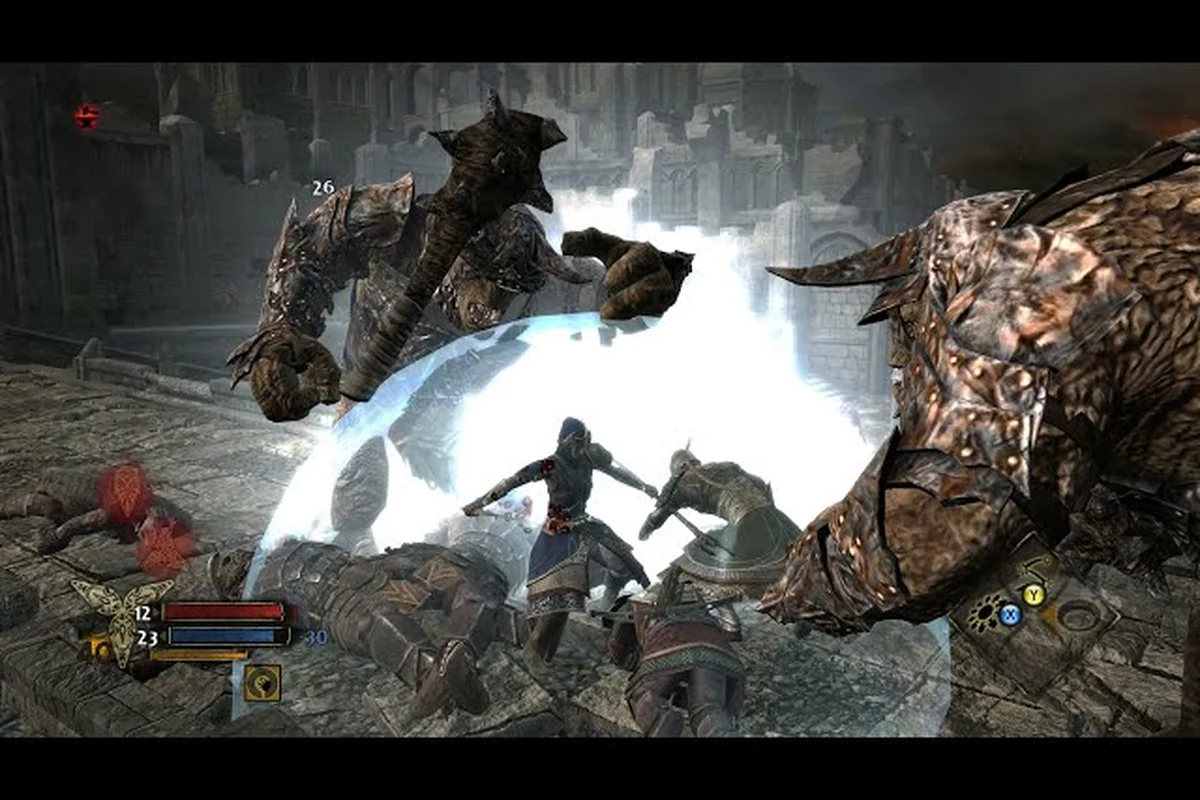
The original 2011 release buried consumables behind a clunky radial menu that paused combat, which made mid-fight revival nearly impossible on higher difficulties. The Legacy Edition fixes this with a dedicated consumables panel that sits directly in the HUD, letting you bind health and mana potions to instant-access keys. According to the official Steam Store Page, the remaster also adds on-the-fly character hot-swapping, refined enemy locking, and visible Health, Mana, and EXP bars — all of which change how you approach revival.
When a hero drops to zero HP, they enter a downed state rather than dying instantly. You have a short window to revive them by walking close and holding the interact button. The problem is that the downed hero is usually surrounded by enemies who will interrupt your revive attempt. This is where the hot-swap mechanic shines: you can instantly switch to whichever hero is still standing and use their potion supply to stabilize the fight before attempting the pickup.
The improved UI also shows each hero's potion count in real time, so you know exactly who has health potions left and who is running on empty. Community reports on the Steam Community Hub confirm that the visible EXP and Mana bars make it much easier to track when a hero is about to run dry mid-combo, which is precisely when you need to hot-swap to a fresh character.
Health Potions: Types, Effects, and When to Use Them
Potion Cooldown Management Across the Three Heroes
Each hero's potion usage is governed by distinct cooldown timers, making revive-phase sustain a matter of rotation, not just inventory. When Eradan goes down, you cannot simply spam a Health Potion on the next hero; the shared consumables panel forces you to track global cooldowns. A concrete case: during the Ettenmoors siege, if you use a Greater Health Potion on Farin to survive, you must wait the full cooldown before using another on Andriel. This 2-3 second window is where a revive attempt succeeds or fails, so stagger potion usage before initiating a revive.
The 97% Positive-Review Economy: When to Spend on Potions
The Legacy Edition's economy, praised in its 97% positive Steam reviews, changes how you should budget for potions. At the $19.99 launch price, the game's loot tables are tuned to the original 2011 release, meaning gold is scarce in the early chapters. A data-driven strategy: in Chapter 2, skip buying Mana Potions for Andriel and instead rely on her passive mana regen, saving roughly 150 gold. This allows you to stockpile 5-6 Greater Health Potions by Chapter 3, which is the critical threshold for surviving the Barrow-downs boss fight where revive frequency spikes.
Health potions are your primary revival tool because they keep the active hero alive long enough to reach a downed ally. The Legacy Edition keeps the original potion tiers but makes them far easier to manage with the new consumables panel. Here is the full breakdown of what you can carry:
| Potion Tier | Health Restored | Cooldown | Best Used For |
|---|---|---|---|
| Minor Healing Potion | 25% of max HP | 2 seconds | Topping off between fights |
| Healing Potion | 50% of max HP | 3 seconds | Mid-combat recovery |
| Greater Healing Potion | 75% of max HP | 4 seconds | Boss fights and revive windows |
| Elven Draught | 100% of max HP | 5 seconds | Emergency saves before a revive |
The key insight from community testing is that Greater Healing Potions are the sweet spot for revival scenarios. A Minor potion often leaves you too low to survive the revive animation, while an Elven Draught is overkill for most trash encounters and wastes valuable inventory space. Carry a stack of Greater potions for boss arenas and save the Elven Draughts for the final Carn Dûm push.
Your potion inventory is shared across all three heroes, which means the potion you drink as Farin is the same potion Eradan would have used. This shared pool makes resource management critical: if you burn all your health potions keeping Farin alive, Eradan will have nothing left when you hot-swap to him for the revive. The dedicated consumables panel helps here because it shows the shared count at all times, so you can plan around the collective supply rather than per-hero stock.
Mana Potions and Ability Sustain During Revives
Mana potions are just as important as health potions in this War in the North potion guide, because most revive attempts require a burst of abilities to clear space around the downed hero. Andriel's healing spells, Farin's area attacks, and Eradan's ranged shots all consume mana, and running dry at the wrong moment means you cannot create the opening needed for a safe revive.
| Mana Potion Tier | Mana Restored | Cooldown | Best Used For |
|---|---|---|---|
| Minor Mana Potion | 25% of max mana | 2 seconds | Sustaining long fights |
| Mana Potion | 50% of max mana | 3 seconds | Ability rotations |
| Greater Mana Potion | 75% of max mana | 4 seconds | Boss burst windows |
| Elven Mana Draught | 100% of max mana | 5 seconds | Emergency ability chains |
The Legacy Edition's improved UI makes mana tracking much easier because the visible Mana bar sits right next to the Health bar for the active hero. When you hot-swap to a hero who has been idle, their mana has likely regenerated to full, which is a free resource you should exploit. The strategy is to keep your primary hero's mana topped off with regular potions while saving the Elven Mana Draught for the moment you need to chain three abilities back-to-back to stagger a boss and create a revive window.
Hot-Swapping as a Core Revival Strategy
Hot-swapping is the single most important mechanic in this War in the North revive guide, because it lets you rotate between heroes without pausing the game. The Legacy Edition maps this to a single button press, and the refined enemy locking system ensures your new active hero immediately targets the correct threat. This turns revival into a three-step rotation rather than a desperate gamble.
Step 1: Assess the downed hero's position. If they fell in the middle of a pack, do not attempt a direct revive. Instead, hot-swap to the hero with the best crowd control and clear a path first.
Step 2: Drink a health potion before starting the revive. The revive animation locks you in place, so you need to enter it at full health. Community data suggests that starting the revive below 50% HP almost always results in the reviving hero getting interrupted and taking lethal damage.
Step 3: Use the hot-swap to reposition. If the downed hero is in a bad spot, you can swap to a ranged hero, clear the immediate threats, then swap back to a tanky hero to tank the revive animation. The refined enemy locking makes this much smoother because your new hero automatically focuses the highest-threat target.
This hot-swap strategy is especially effective when paired with the right gear. If you are running a heavy armor setup on Farin, he can absorb damage during the revive animation while Eradan and Andriel provide covering fire. The gear progression guide covers which armor sets give you the survivability bonuses needed to make this work on Heroic difficulty.
Potion Economy and Inventory Management
Managing your potion supply across a full campaign requires more than just knowing which potions to drink — you need a system for acquiring, storing, and rationing them. The Legacy Edition's additional save slots and autosave system give you more freedom to experiment, but the potion economy itself remains unchanged from the original design.
Where to find health and mana potions:
-
Vendors in Bree, Rivendell, and Nordinbad restock potions every time you return to town, so buy in bulk before heading into the wilderness.
-
Loot drops from humanoid enemies frequently include potions, especially if you are playing on higher difficulties where drop rates seem to increase.
-
Breakable objects like barrels and crates often contain potions, but you need Farin's smash ability to access them.
-
Quest rewards occasionally include unique potions that restore more than standard tiers.
The shared potion pool means you should never carry more than 10 of any single tier, because the inventory space is better used for gear and crafting materials. A good rule of thumb reported by players is to carry 5 Greater Health Potions, 3 Greater Mana Potions, and 2 Elven Draughts at all times, with the remaining slots filled by Minor potions for topping off between fights.
Advanced Revive Tactics for Heroic and Legendary Difficulty
The Autosave and Save-Slot Safety Net for Revive Attempts
The Legacy Edition's new autosave system and expanded save slots directly de-risk risky revive plays. Before the August 11, 2026 update, a failed revive mid-boss-fight could force a full chapter restart. Now, the autosave triggers at key checkpoints, allowing you to attempt a risky resurrection—like reviving Farin mid-aggro from a Warg—and if it fails, you reload within seconds instead of losing 20 minutes of progress. Use the additional manual save slots to create a "pre-boss" backup, ensuring a failed revive never costs you a full clear.
Hot-Swap Positioning to Secure a Safe Revive Window
The on-the-fly character hot-swapping mechanic is more than a convenience—it is a positioning tool for revives. The trick is to hot-swap to your tankiest hero, typically Farin, to absorb aggro while the downed hero's body is clear of enemy attack animations. For example, against Agandaûr's adds, swap to Farin, use a Taunt ability to draw the Orc Champions away, then immediately swap back to Eradan to initiate the revive. This creates a 3-4 second safe window, which is precisely the time needed to complete the revive animation without interruption.
| Legacy Edition Feature | 2011 Original | Legacy Edition |
|---|---|---|
| Save system | Single save slot, manual only | Additional save slots + new autosave |
| Character switching | Not available | On-the-fly hot-swapping |
| Enemy targeting | Basic lock-on | Refined enemy locking |
| UI displays | No visible stat bars | Visible Health, Mana, and EXP bars |
| Performance | 30 FPS on consoles | 60 FPS gameplay |
| Input support | Controller only | Gyro controls (PS5/Switch), controller support |
| Display mode | Fullscreen only | Borderless mode + dedicated consumables panel |
Once you master the basics, the real challenge begins on Heroic and Legendary difficulties where enemy damage output makes every revive attempt a high-stakes gamble. The autosave system in the Legacy Edition helps because it creates more frequent checkpoints, but you still want to avoid dying in the first place.
Advanced tactic 1: The sacrificial swap. If two heroes are down and one is standing, swap to the hero closest to death and use them as a distraction. Enemies will focus on the newly active hero, giving your AI-controlled ally time to revive the other downed hero. This sounds counterintuitive, but the AI is surprisingly good at reviving when not under direct attack.
Advanced tactic 2: Potion chaining. The cooldown on health potions is short enough that you can drink two in quick succession if you time them correctly. Drink a Minor potion first, then immediately follow with a Greater potion. The Minor potion's shorter cooldown means it comes off cooldown faster, giving you a third potion option if the fight drags on.
Advanced tactic 3: Mana conservation for revives. Always keep at least one full mana bar in reserve when you enter a boss arena. The moment a hero goes down, you need to be able to cast a stagger ability or a healing spell to create the revive window. Running out of mana at this critical moment is the most common cause of party wipes, according to community reports on the Steam forums.
If you are struggling with a specific chapter's revive-heavy encounters, the chapter 3 guide breaks down the Ettenmoors fights where the revive mechanic gets its toughest test. That section of the campaign throws multiple waves of enemies at you, and knowing when to commit to a revive versus when to retreat and regroup is the difference between survival and a checkpoint reload.
Frequently Asked Questions
How do I revive a downed ally in War in the North?
Walk close to the downed hero and hold the interact button until the revive bar fills. You must have at least one health potion in your shared inventory, because the revive consumes a potion automatically. The Legacy Edition's hot-swap mechanic lets you switch to a healthier hero before attempting the revive.
What is the best potion loadout for boss fights?
Carry 5 Greater Health Potions and 3 Greater Mana Potions as your core loadout, plus 2 Elven Draughts for emergency situations. This gives you enough sustain for most boss encounters while leaving inventory space for loot. Adjust the ratio toward health potions if you are playing as Farin, since his melee role takes more damage.
Does hot-swapping interrupt my current attack combo?
No, hot-swapping is instant and does not interrupt the new hero's ability to act. The refined enemy locking in the Legacy Edition ensures your newly active hero immediately targets the correct threat. This makes hot-swap revival much safer than in the original release, where switching characters required navigating a menu.
Can I craft potions or do I have to buy them?
Potions are primarily purchased from vendors or found as loot drops. There is no crafting system for potions in War in the North, so you need to manage your gold carefully to maintain a healthy stockpile. Vendors in Bree and Rivendell offer the best selection and restock after each story mission.
How does the shared potion inventory work across heroes?
All three heroes draw from the same potion pool, so drinking a health potion as Eradan reduces the supply available to Andriel and Farin. This shared pool makes resource management critical, especially during co-op play where both players may be drinking potions simultaneously. The Legacy Edition's visible potion counter helps you track the collective supply.